
Table of Contents
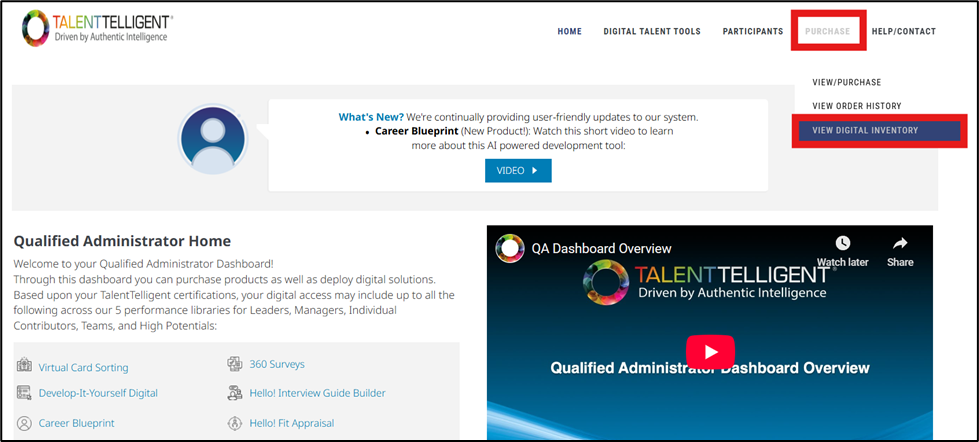
From the Qualified Administrator Home, go to Purchase → View Digital Inventory.
Page Overview #
The View Digital Inventory page provides a summary of your available digital credits across all TalentTelligent tools. This page allows you to review how many credits have been issued, used, and remain available for each digital product. You can also purchase additional credits directly from this screen when needed.
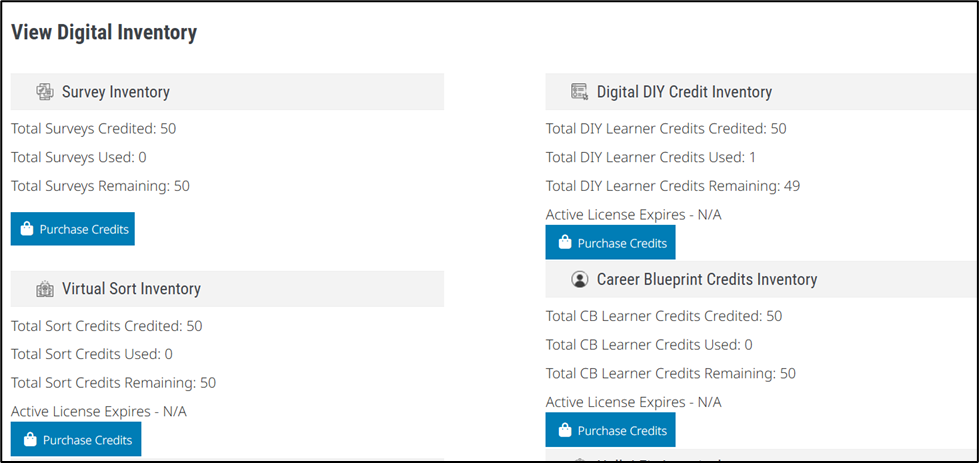
Each digital tool appears under its own labeled section, such as:
- Survey Inventory
- Virtual Sort Inventory
- Interview Guide Credit Inventory
- Digital DIY Credit Inventory
- Career Blueprint Credits Inventory
- Hello! Fit Appraisal
- Career Architect
Each section displays:
- Total Credits Credited – The number of credits issued to your account.
- Total Credits Used – The number of credits that have already been utilized.
- Total Credits Remaining – The number of credits still available.
- Active License Expires – The license expiration date, if applicable (not shown for Survey Inventory).
A Purchase Credits button is available within each section, allowing you to buy additional credits for that specific tool.